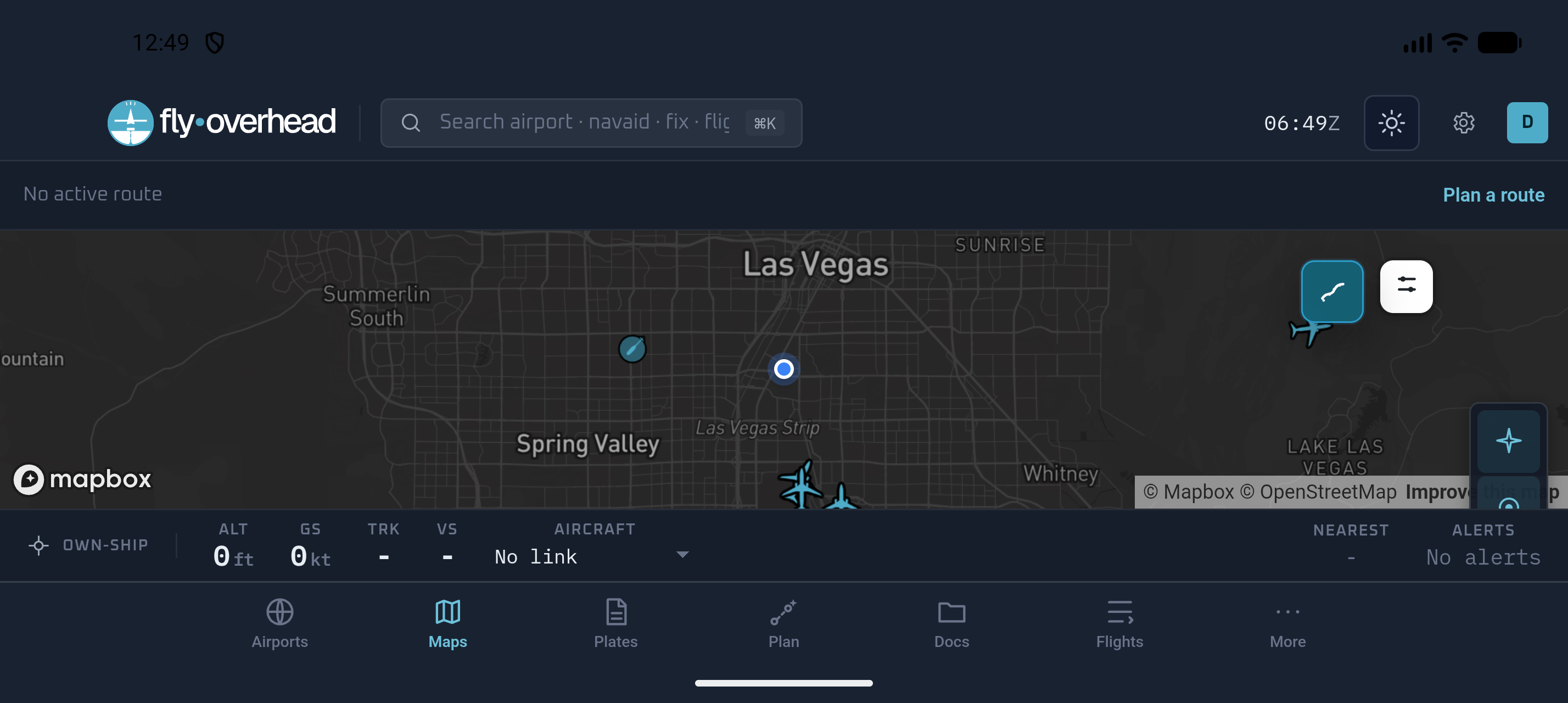
Fly Overhead is our pick for the best Android EFB in 2026 because it is unusually strong on both sides of the hangar door: serious route planning and AI-assisted briefing before flight, then charts, live traffic, weather, plates, alerts, and nearest-airport context in the cockpit. The same flight stays with you through the postflight debrief and logbook - on Android, iPad, or a desktop browser.
A disclosure before the comparison: we build Fly Overhead. We have linked to each developer's current listing and named the gaps in our own app. We believe Fly Overhead is the best overall Android choice, but Garmin Pilot, FltPlan Go, and iFly EFB still win narrower use cases. Features were checked July 2026, but subscriptions and device requirements can change; verify them before buying hardware around an app.
The best Android EFB depends on your cockpit
| Android EFB | Best fit | Cost shape | Main trade-off |
|---|---|---|---|
| Fly Overhead | Best overall: planning, briefing, in-flight awareness, logbook, and CFI workflows | Free live map; EFB from $7.99/month | No synthetic vision, direct FAA filing, or certified-panel integration yet |
| Garmin Pilot | Garmin avionics owners who prioritize panel integration | Paid subscription; 30-day trial | Denser interface; strongest case requires buying into the Garmin ecosystem |
| FltPlan Go | Pilots who need charts, filing, weather, and ADS-B support for free | Free with ads | Older, busier workflow with less briefing and postflight intelligence |
| iFly EFB | VFR and IFR pilots who want a cockpit-first moving map | Paid subscription; 30-day trial | U.S.-focused with a narrower planning-to-logbook workflow |
For most Android pilots, Fly Overhead is the first app we recommend. It does more than reproduce a conventional moving map: the route, aircraft, weather picture, RightSeat brief, cockpit workspace, flight history, and logbook behave as one system. Garmin Pilot is the better answer only when compatible Garmin panel integration is the deciding requirement. FltPlan Go is the budget answer, and iFly is a capable traditional moving-map alternative, but neither matches Fly Overhead's complete planning-to-flight-to-debrief workflow.
First: ForeFlight does not run on Android
This is still the question that sends many pilots searching. ForeFlight Mobile is available for iPad and iPhone, not Android. ForeFlight's own Android support page says there are no plans for an Android version. Its web tools can help with planning, but they do not turn a Galaxy phone or tablet into ForeFlight Mobile.
That does not make Android a poor EFB platform. It means you should choose a workflow designed for Android instead of trying to reproduce an iPad app screen for screen. The strongest alternatives cover the core job - current charts, weather, route planning, airport data, documents, and a usable offline mode - then differentiate through avionics connectivity, AI, price, or cockpit ergonomics.
Fly Overhead: the best overall Android EFB
The best Android EFB for flight planning
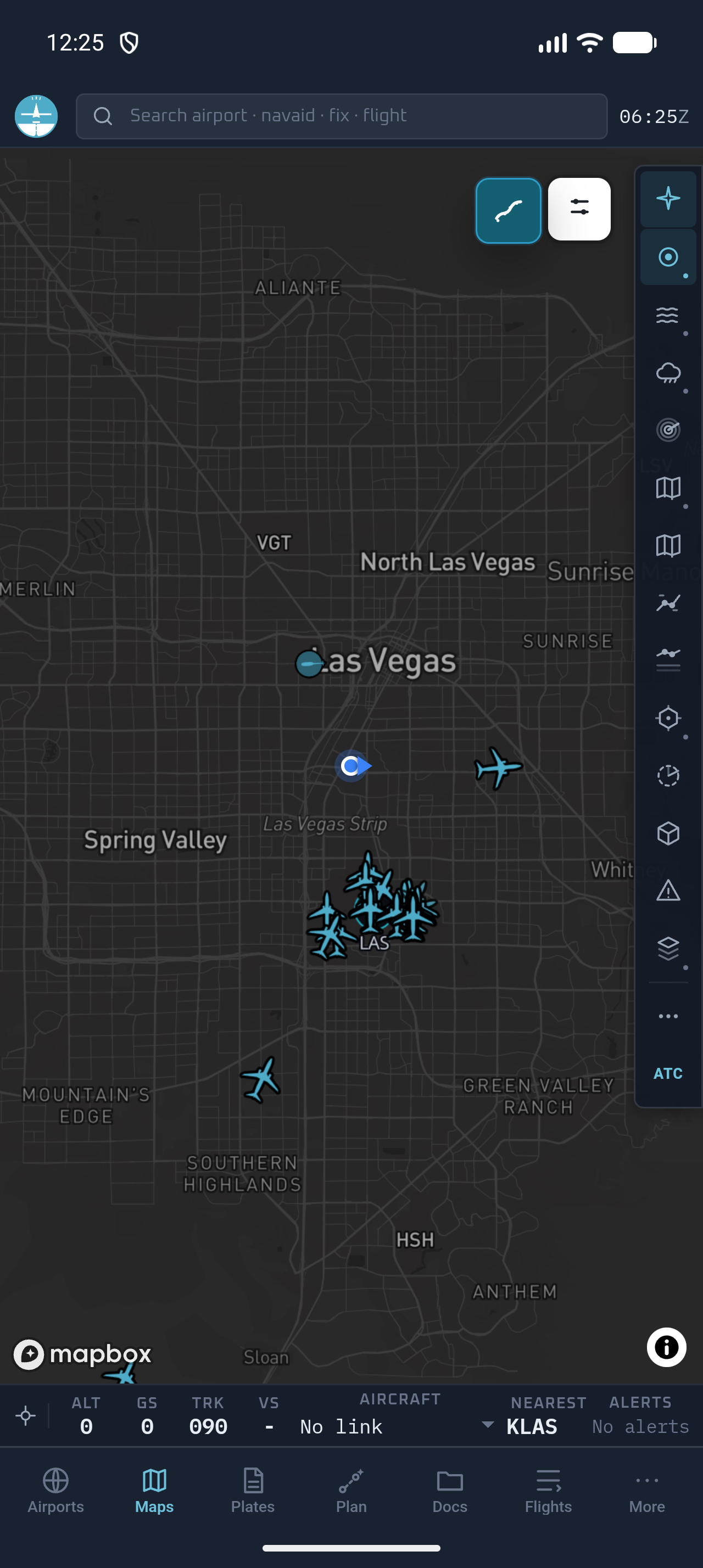
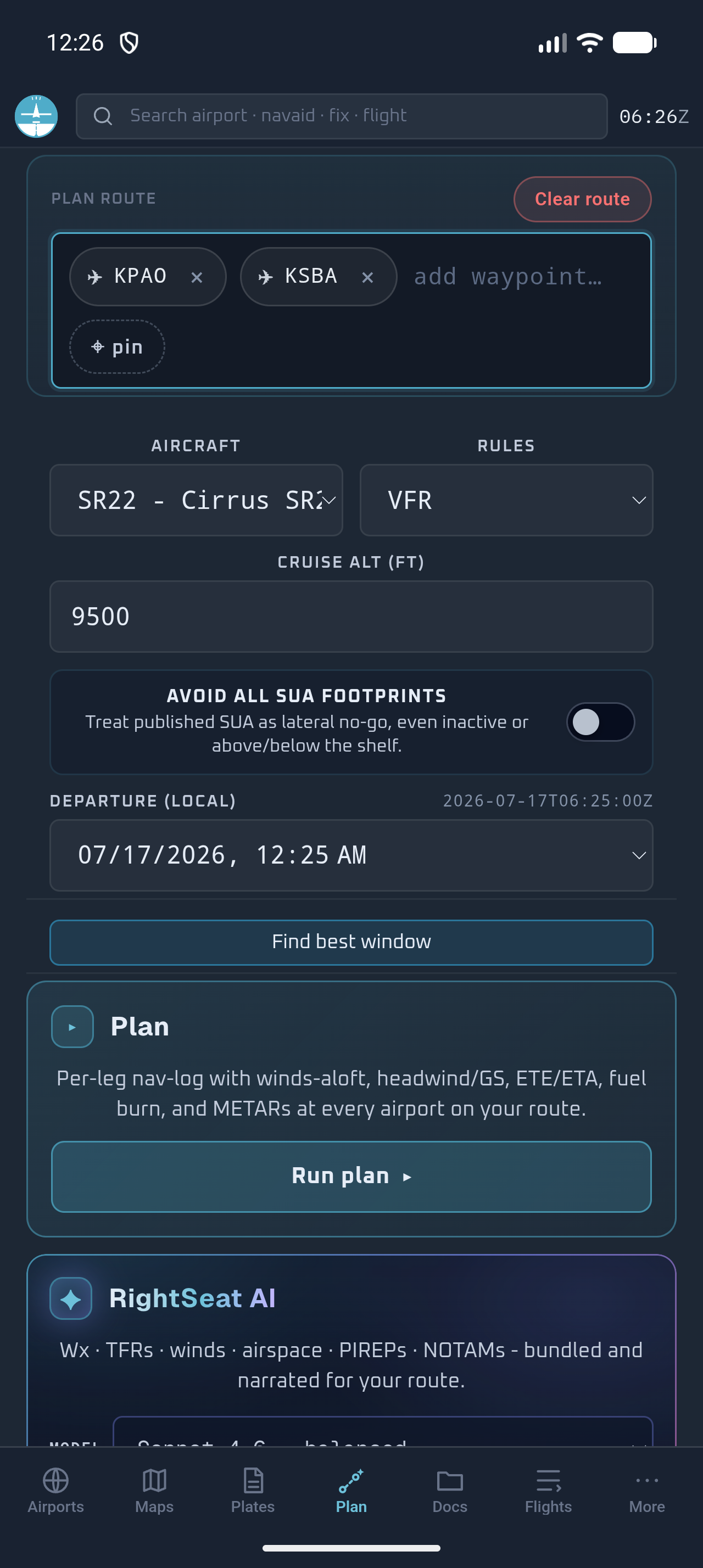
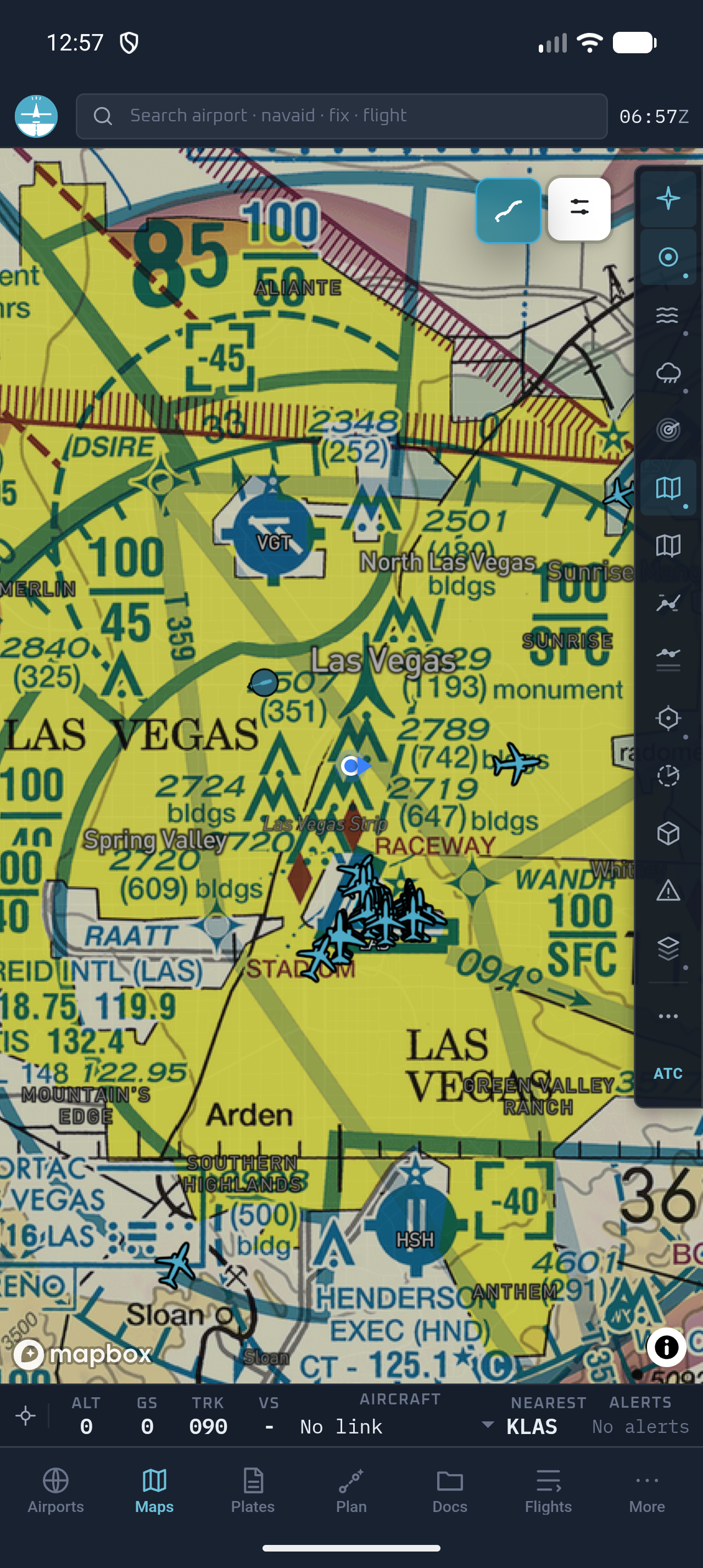
Fly Overhead's Android app uses the same account and data as the installable web app. Build a route on a large monitor, open it on an Android phone or tablet, and bring the same aircraft profile, brief, charts, and documents with you. FAA VFR sectionals, TACs, IFR low and high enroute charts, terminal procedures, weather, TFRs, NOTAMs, PIREPs, terrain, and live traffic share one workspace. Charts can be saved for offline use rather than relying on ramp connectivity.
Planning is where Fly Overhead separates itself. The standard planner builds a per-leg nav log with winds aloft, groundspeed, ETE/ETA, fuel burn, and METARs along the route. It can search for a better departure window and account for published special-use-airspace footprints. RightSeat then turns weather, TFRs, winds, airspace, PIREPs, NOTAMs, terrain, and the selected aircraft into a structured brief for the pilot to verify. Competing Android apps can assemble a route; Fly Overhead helps the pilot understand the flight.
The best Android EFB in flight
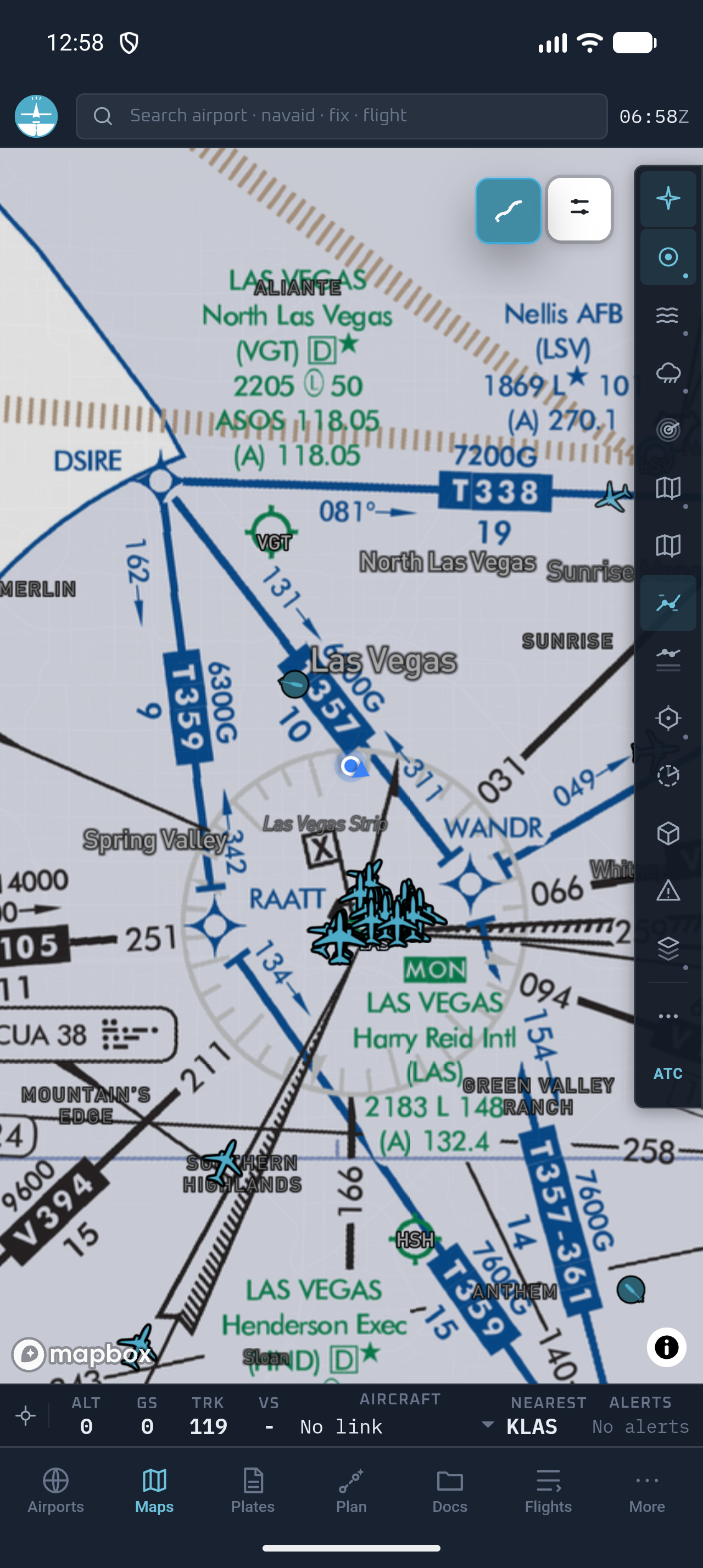
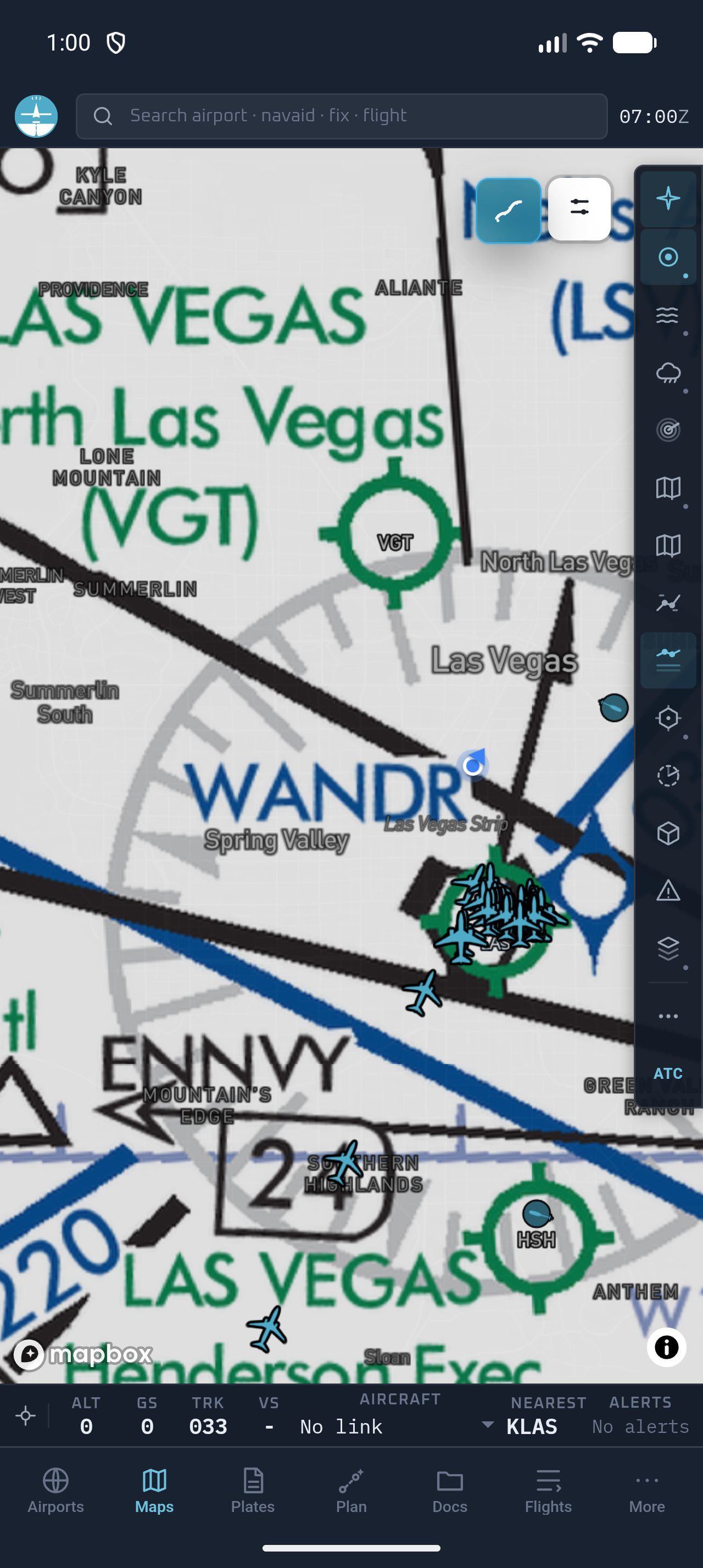
In the cockpit, the Android app keeps the information that changes the next decision on one screen: ownship, nearby traffic, nearest airport, alerts, route status, and fast layer controls for aviation charts, weather, airspace, and terrain. Airports, plates, the map, the planner, offline documents, and saved flights are persistent bottom-level workspaces, so the pilot is not backing through a maze of menus when workload rises. That combination of a clean live map and the context built during planning is why Fly Overhead is more than a desktop planner that happens to have an Android app.
VFR, IFR Low, and IFR High on Android
Fly Overhead does not make an Android pilot choose a simplified mobile map. The actual FAA chart layers are in the app: switch from a VFR sectional to IFR Low or IFR High while ownship, live traffic, nearest airport, alerts, and the rest of the EFB workspace stay in place.
One workflow through shutdown
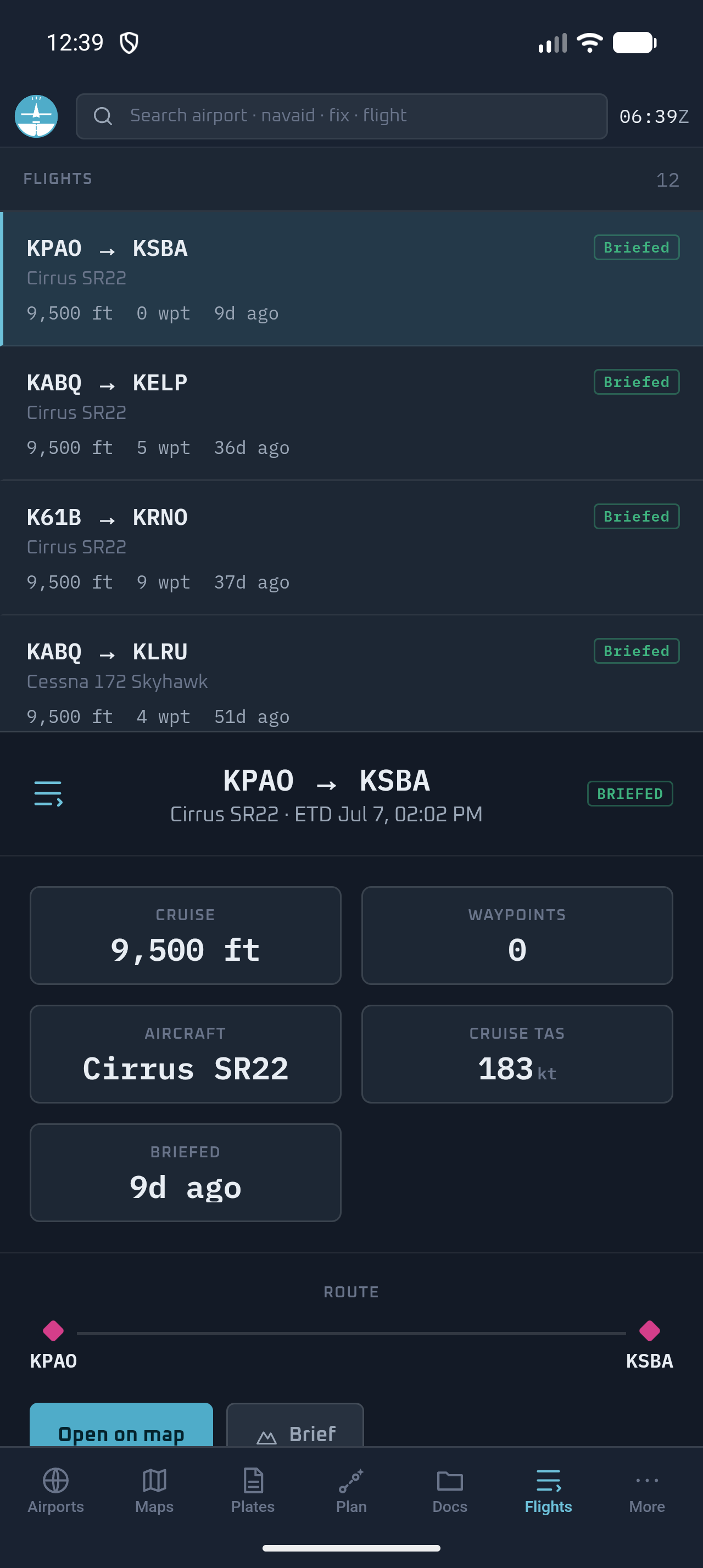
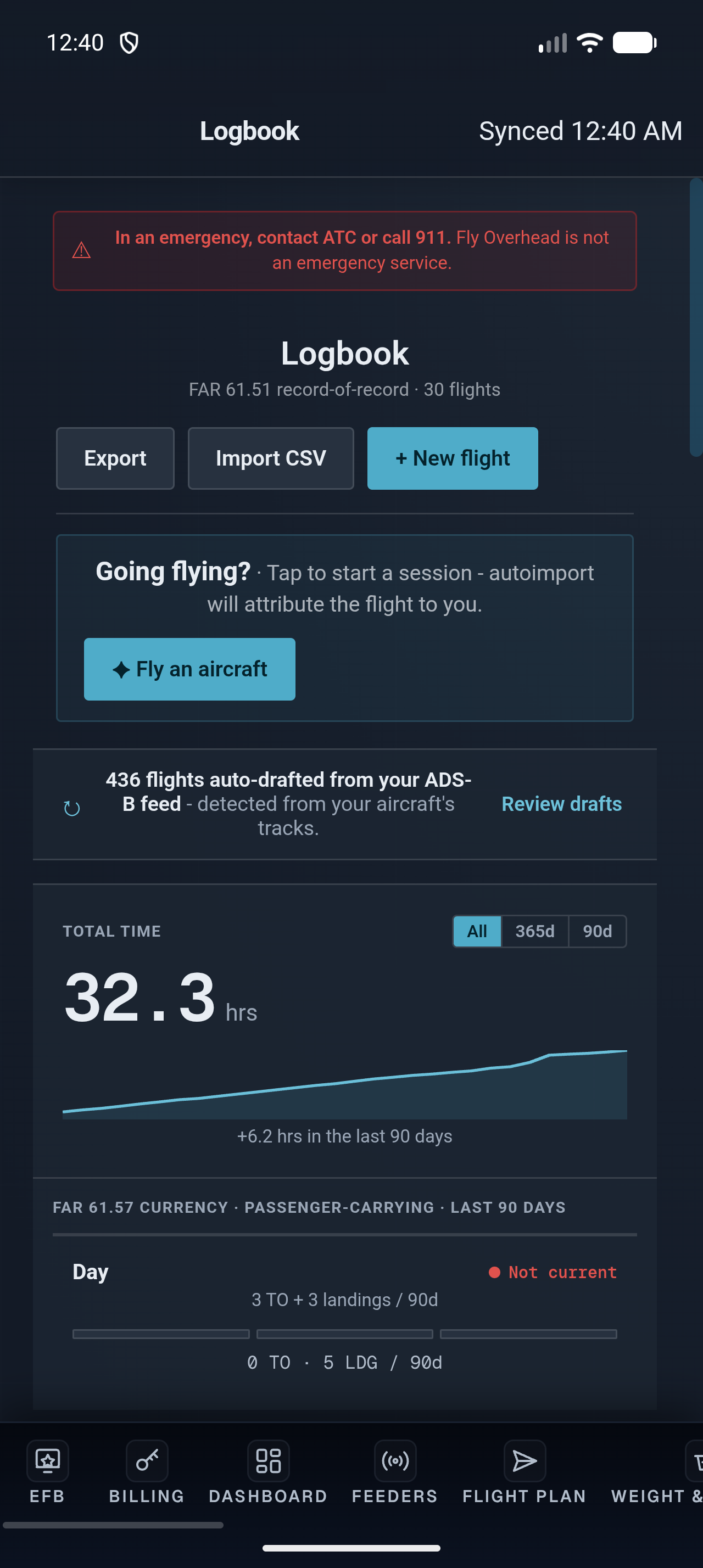
After flight, a voice debrief becomes an editable logbook draft. Flights can also be auto-drafted from ADS-B history, and the logbook tracks FAR 61.57 passenger-carrying currency. A CFI can link students, review flights, grade maneuvers, and track experience toward checkride requirements. Garmin Pilot, FltPlan Go, and iFly each solve pieces of the EFB job; Fly Overhead is designed to close the entire loop.
The honest limitations matter. Fly Overhead does not yet have synthetic vision, a Flight Stream-style link to certified panel avionics, or a dedicated portable ADS-B receiver ecosystem. Flight-plan filing currently hands off to 1800wxbrief rather than filing directly in the app, and coverage is centered on the contiguous United States. It is an advisory tool, not approved for primary navigation. Pilots who depend on panel integration or direct in-app filing should keep reading.
What the other Android EFBs look like
These are official promotional screenshots from the apps' Google Play listings, shown for product identification and comparison. They also make the difference in product philosophy visible: Garmin Pilot is panel-ecosystem driven, FltPlan Go is a dense free utility, and iFly emphasizes a conventional in-flight moving map.
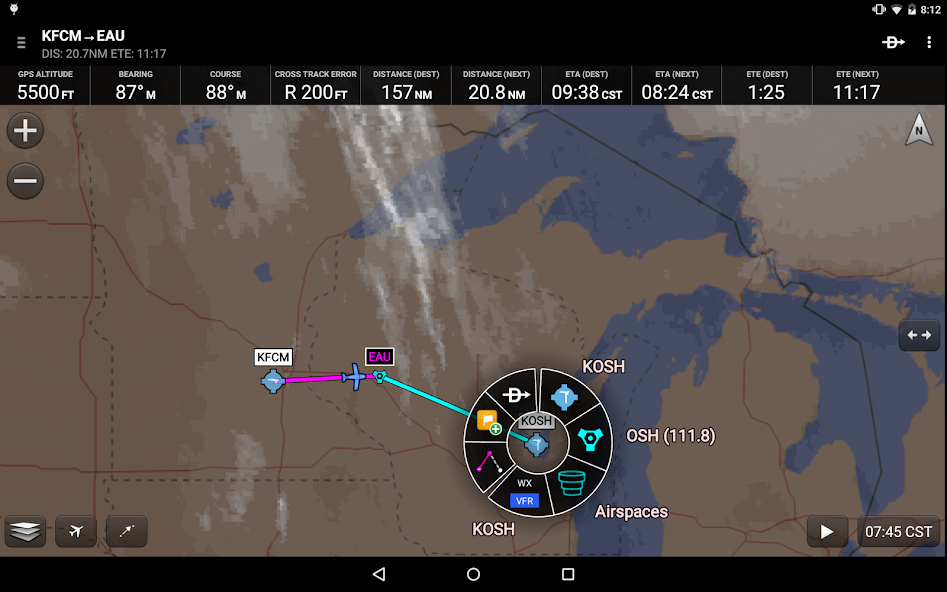
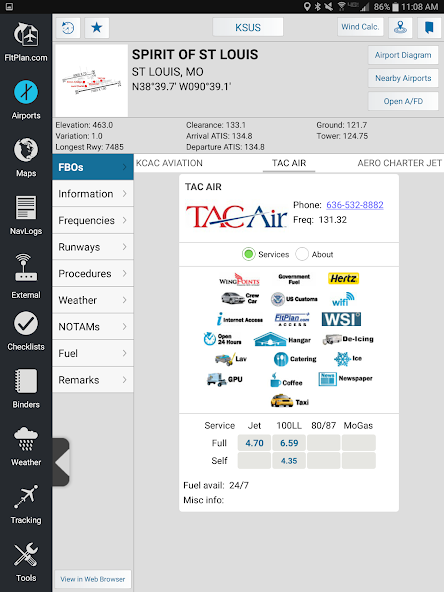
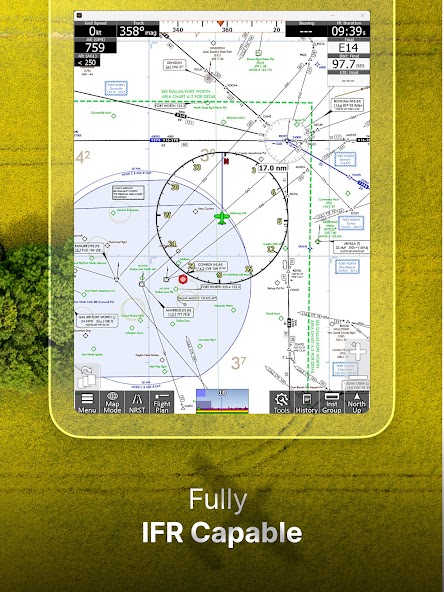
Garmin Pilot: best for a Garmin-equipped aircraft
Garmin Pilot for Android is the closest legacy ForeFlight alternative for a pilot who wants a conventional EFB. It covers flight planning and filing, VFR and IFR charts, weather, NOTAMs, navigation, and an electronic logbook. The current Google Play listing offers a 30-day trial.
Its decisive advantage is Garmin Connext. With compatible Garmin avionics and Flight Stream hardware, routes and cockpit data can move between the panel and the tablet. The app also mirrors the logic of Garmin's touchscreen avionics, which shortens the mental jump between planning and flying for a Garmin pilot. That integration is hard for a hardware-neutral EFB to match.
Choose Garmin Pilot when the panel is the purchase decision, when direct filing and synthetic vision are requirements, or when you want one established vendor spanning portable app and installed avionics. The trade-off is a denser interface, plus a subscription whose value is strongest when you use the rest of the Garmin stack. Without compatible Garmin hardware, Fly Overhead offers a more modern planning, briefing, in-flight, and postflight workflow across more kinds of screens.
FltPlan Go: best free Android EFB
Garmin also owns FltPlan Go, and it remains the benchmark when “free” must mean a genuinely capable EFB rather than a limited trial. Its Android listing includes moving maps, sectionals and enroute charts, geo-referenced approach plates and airport diagrams in the U.S. and Canada, weather, NOTAMs, in-app flight-plan filing, weight and balance, checklists, binders, a logbook, and support for a long list of external ADS-B and avionics devices. NavLogs can sync and download for offline use.
The cost is interface friction and a less cohesive workflow rather than subscription dollars. FltPlan Go exposes a lot of capability, and the workflow feels more like a deep utility than a modern consumer app. Pilots willing to learn it receive an unusually complete toolkit for free. It also makes a sensible backup, but pilots who value fast planning, readable in-flight context, and an intelligent postflight record will find Fly Overhead a much stronger primary EFB.
iFly EFB: best for a cockpit-first Android interface
iFly EFB is built around in-flight use: large controls, high-contrast maps, route editing on FAA charts, a vertical profile, alerts, instruments, weight and balance, checklists, NOTAMs, and a prominent nearest-airport action. Its listing supports Android 9 or newer, calls for at least 1 GB of storage, and offers a 30-day trial. It also works with common portable ADS-B receivers and flight simulators.
Put iFly on the shortlist when familiar moving-map controls and broad receiver compatibility outweigh everything before and after the airborne phase. Fly Overhead also prioritizes legibility, touch targets, alerts, and a clean in-flight moving map, while adding stronger cross-device planning, briefing, debrief, logbook, and CFI workflows. iFly is U.S.-focused, so pilots flying elsewhere should confirm chart and data coverage first.
What to check before choosing an Android tablet EFB
- Offline behavior: download the charts, procedures, route, and documents for a real trip, enable airplane mode, and open everything again. “Offline support” is only useful when the exact material you need is actually cached.
- Screen and heat: use a bright display, shade it from direct sun, and test the mount while charging with GPS active. A tablet that thermal-throttles on the ramp is not cockpit-ready.
- GPS hardware: confirm that the specific tablet has a GNSS receiver, or budget for compatible external GPS/ADS-B hardware. Do not assume every Wi-Fi tablet has the sensors you need.
- Receiver and panel compatibility: check the exact model numbers, not just the words “ADS-B compatible.” Garmin Pilot, FltPlan Go, and iFly publish different hardware support lists.
- Update discipline: verify the chart cycle and data status before each flight. Automatic downloads are helpful, not a substitute for checking effective dates.
- A real backup: carry a charged phone, second tablet, or the charts and procedures appropriate to the operation. Any app, battery, mount, cable, or device can fail.
Our practical recommendation
Start with Fly Overhead. It is the strongest overall choice for an Android pilot who wants one EFB to plan the route, understand the briefing, support the flight, and preserve the record afterward. Use the free live map before paying, then move into the full EFB from $7.99 per month. Trial Garmin Pilot instead if certified-panel integration is non-negotiable; keep FltPlan Go as a free backup; consider iFly if a traditional receiver-connected moving map is the only job you need.
If you compare, run the same representative flight through each app: create the route, inspect weather and NOTAMs, save charts offline, open an approach plate, and find the nearest suitable airport. We built Fly Overhead to win that test before takeoff, in the cockpit, and again at shutdown.
Frequently asked questions
What is the best EFB app for Android?
Fly Overhead is the best overall Android EFB for pilots who want advanced planning, AI-assisted briefs, live in-flight context, charts, traffic, weather, logbook, and CFI workflows in one cross-device system. Garmin Pilot is the narrower choice for deep Garmin panel integration, while FltPlan Go is the strongest free option.
Does ForeFlight work on Android phones or tablets?
No. ForeFlight Mobile runs on iPad and iPhone, and ForeFlight says it has no plans to release an Android version. Android pilots can use Garmin Pilot, FltPlan Go, iFly EFB, or Fly Overhead instead.
Is there a free Android EFB?
FltPlan Go is a full-featured free Android EFB with charts, weather, filing, plates, and offline NavLogs. Fly Overhead also provides a free live ADS-B map, with paid EFB plans starting at $7.99 per month.
Can an Android tablet be used as an EFB?
Yes. Confirm that the tablet, app, external receivers, storage, mount, power setup, and offline charts fit the intended operation. Pilots should also carry an appropriate backup and verify current data before flight.
Does Fly Overhead work offline on Android?
Fly Overhead can save charts for offline use on Android. Pilots should download and test the required charts and documents in airplane mode before relying on them away from connectivity.